
The Lending Pro Forma: Know Your Capital Need Before You Fund a Single Loan
An Excel model for payday, title, installment and online lenders, Texas CABs included. Pre-loaded with real operating averages. Type about 20 numbers and the whole business recalculates.
Last updated: November 16, 2026
Lending businesses rarely die from bad loans. They die from bad math done six months too late.
The operator who raises $500,000 for a business that needs $1,000,000 does not find out on day one. He finds out in month 13, when the loan book is finally growing, the cash is gone, and every new customer he funds digs the hole deeper. He did not lack hustle. He lacked a model that told him the truth before he signed the lease.
This workbook tells you the truth. Open it, and one payday store plus an online installment product is already running on 36 months of numbers drawn from real stores, real call centers and real investor packages. Replace any benchmark with your own figure. Flip the scenario switch to Stress. Watch what happens to your cash.

Excel for Windows or Mac. Free updates to this edition.
Get the Model30-day, no-hassle, 100% refund if it is not worth the price.
Delivery: pay with PayPal and your file is emailed within 24 hours. Need it this minute? Gumroad emails it the moment you pay.
What it answers
Four questions decide whether a lending business lives. The model answers all four on one tab, and it shows the work on the rest.
- How much money do I need, and when? The cash you need to raise, the month the hole is deepest, and a funding line that tells you in dollars how short you are until you have raised enough.
- When do I turn profitable, and when do I get my money back? First profitable month and cash payback month, calculated, not guessed.
- Does one loan make money? Contribution per loan and per $100 lent, for new and returning customers, on every product. Plus the break-even loss rate: the default rate at which that loan earns nothing.
- What does the investor earn? Note schedule with interest-only period, debt service coverage, and the owner's multiple on equity at month 36.
Twenty numbers, then the answer
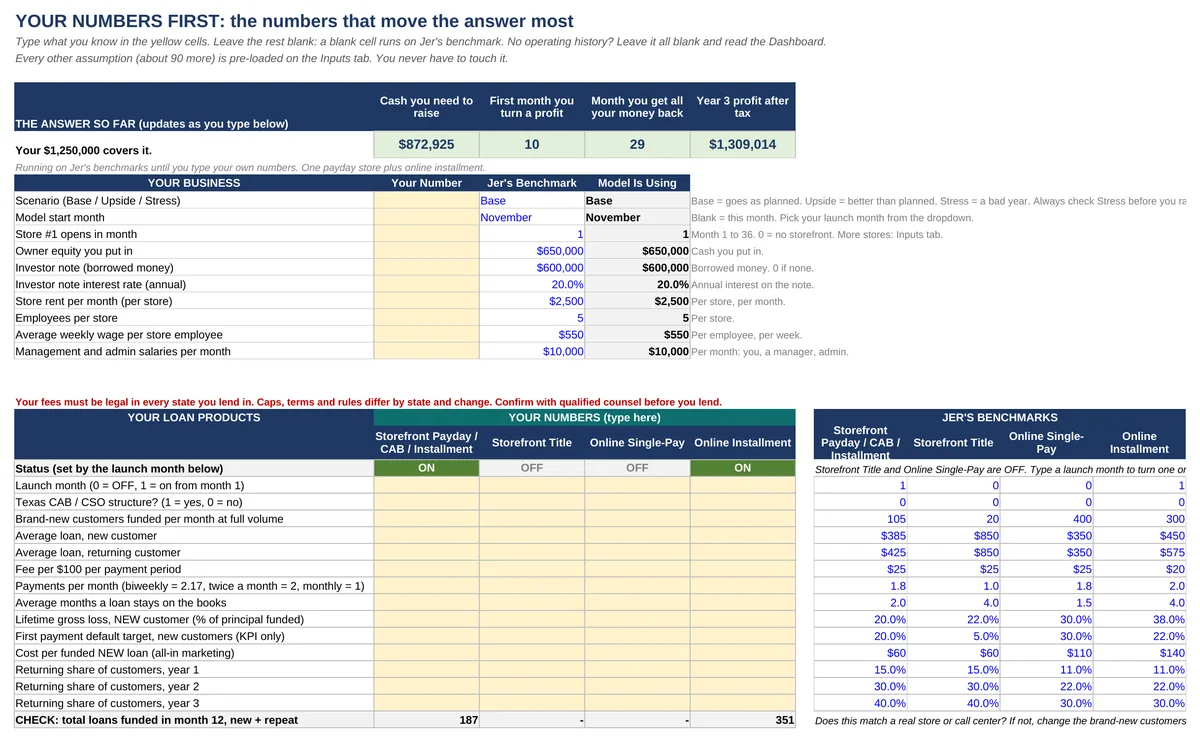
Most models make you fill in a hundred cells before they tell you anything. This one opens on a single tab called Your Numbers First: the short list of inputs that move the answer most. Loan size, fee, months on the books, losses, cost to land a customer, rent, payroll, capital. Type what you know. Leave the rest blank and the model runs that line on Jer's benchmark.
The answer sits at the top of the same tab and changes as you type: cash you need to raise, first month you turn a profit, month you get all your money back, Year 3 profit after tax. No operating history? Leave every cell blank and read the answer for a typical startup.
What the defaults say
Out of the box, with one payday store plus an online installment product, the model shows:
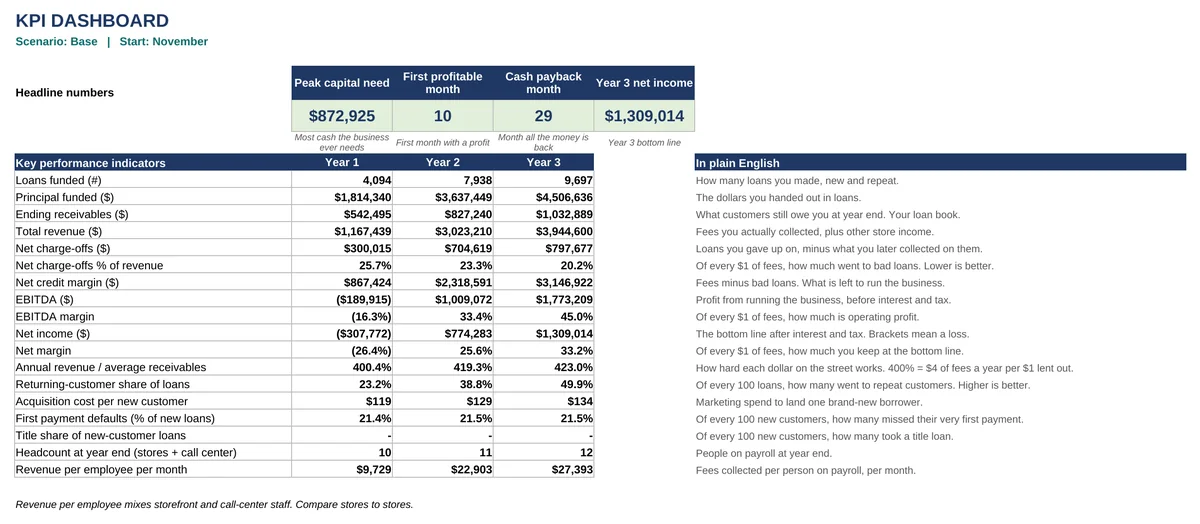
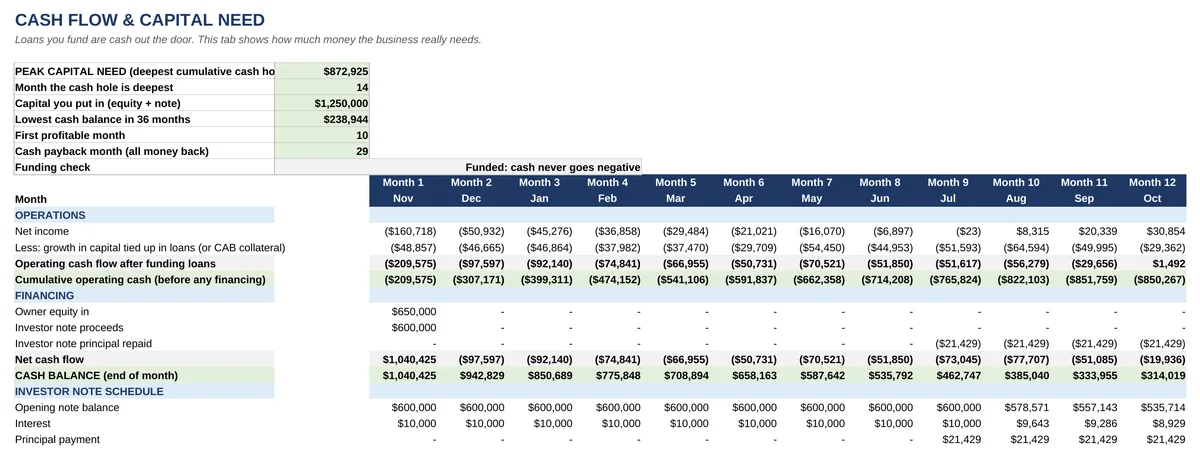
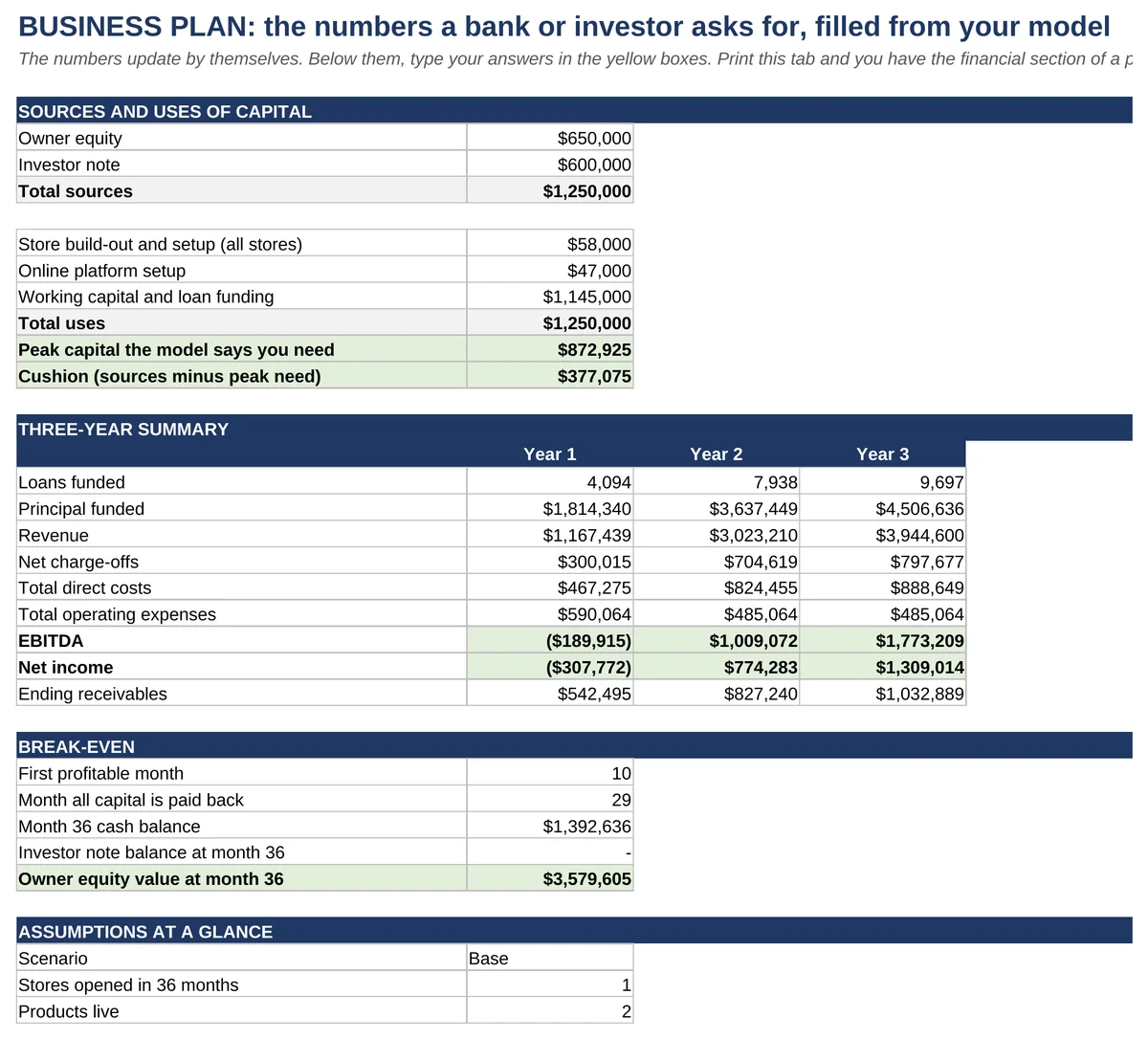
- Cash you need to raise: about $873,000, deepest in month 14. Most first-time operators budget half that.
- First profitable month: 10. Every dollar back by month 29.
- Year 3: $3.9 million in revenue, $1.3 million net income, on a loan book of roughly $1.0 million.
- The payday store funds 187 loans in month 12, new and repeat together. A check line shows that number so you can hold the model against a real store.
- Net charge-offs fall from 26% of revenue in Year 1 to 20% in Year 3. Nothing got easier. The customers came back, and repeat customers pay better.
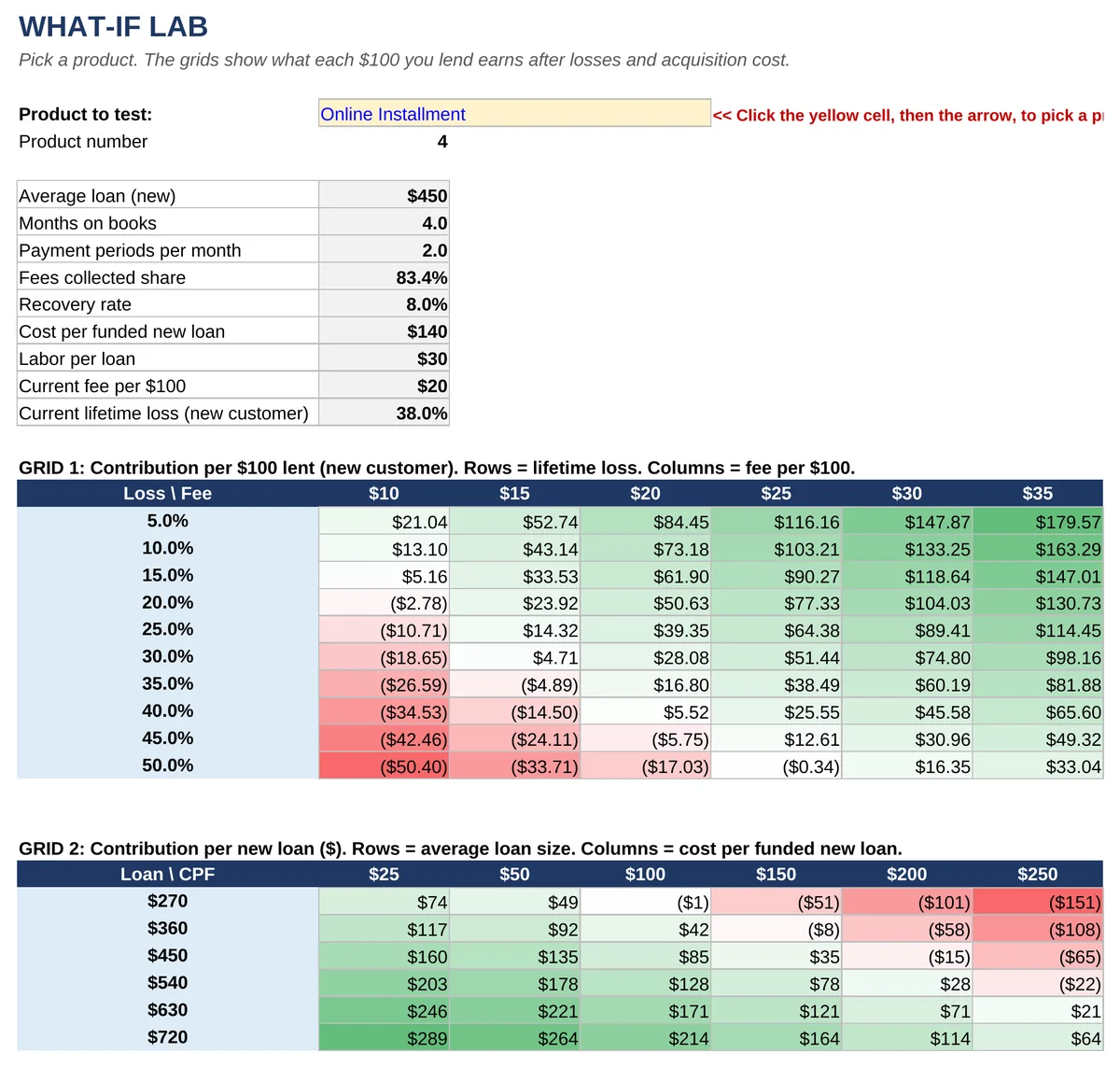
- A new payday customer clears about $32 per $100 lent before overhead. The same loan to a repeat customer clears about $67. A new online installment loan clears about $10, with four points of room between its loss rate and its break-even. That is where online startups run out of cash.
Switch the scenario to Stress, which cuts new loans 20%, pushes losses up 35% and acquisition cost up 25%, and the same business needs $1.35 million, comes up $481,000 short, and does not turn a profit until month 20. A model that only shows you the good case is a brochure. This one shows you the cliff.
How it works
Every input has two columns. Jer's Benchmark is pre-loaded. Your Number is yellow and empty. Leave it blank and the model runs on the benchmark. Type in it and the model runs on you. Delete it and you are back to the benchmark. Beside each input on the Inputs tab sits the range seen across real operations, so you know whether your number is normal or fantasy. A handful of benchmarks are Jer's estimates, not book numbers. Those are marked in pink or red so you know which is which.
Underneath, a portfolio engine builds the loan book month by month: loans funded, principal repaid, charge-offs, recoveries, fees billed and fees actually collected after returned payments. It separates the new customer from the repeat customer, because they are two different businesses. The new one costs real money to acquire and defaults more. The repeat one costs little to bring back and pays better. You enter how many of your customers return each year. The model works out the loans, the losses and the cash.
The columns read Month 1 through Month 36 with the month name beneath. No years anywhere, so the model is current the day you open it. Use an AI assistant? A ready-to-copy prompt sits on the Start Here tab.
Built for the Texas CAB, too
Flip one cell and a product runs as a Texas CAB/CSO. A third-party lender funds the loans and you earn the CAB fee. The lender's interest shows as a memo line and never counts as your revenue. Your capital becomes the collateral you post, set as a percent of loans outstanding, so an operator who has negotiated a lower collateral ratio sees the cash need fall. Losses still land on you through the guarantee. Lender terms vary and Texas rules change, so confirm your structure with counsel.
The 15 tabs
| Tab | What it does |
|---|---|
| Start Here | Five-minute instructions, who should read which tab, the color code, an AI prompt you can copy, and the three rules that keep operators alive. |
| Your Numbers First | About 20 yellow cells that move the answer most, with the four answers at the top and an ON/OFF light for each product. |
| Dashboard | Peak capital need, profitable month, payback month, Year 3 net income, 18 KPIs explained in plain English, four charts. |
| Inputs | Every other assumption, pre-loaded: stores, products, pricing, new and repeat losses, costs, staffing, capital, seasonality, Texas CAB and tribal switches, scenario table, sanity checks. |
| P&L | 36 months plus three annual columns. Revenue, net credit margin, contribution, EBITDA, net income with tax only on cumulative profit. |
| Cash Flow & Capital | Loans you fund are cash out the door. Cumulative cash hole, cash balance, note schedule, Funding check. |
| Investor Returns | Note holder: interest, principal, debt service coverage by year. Owner: equity value, MOIC, annual return, cash-on-cash. |
| Business Plan | Sources and uses, three-year summary and break-even filled in for you, plus the eight questions every investor asks. |
| Unit Economics | One loan start to finish, new customer and repeat. Break-even loss rate. Break-even loans per month. An APR calculator so you know the number before a regulator quotes it to you. |
| What-If Lab | Two color-coded grids: loss rate against pricing, loan size against acquisition cost. Green makes money, red does not. |
| Monthly Scorecard | Type your real results each month: revenue, loans, charge-offs, net income, first payment defaults, returning share. Misses turn red. |
| Portfolio Engine | The month-by-month loan book, every formula visible. |
| Benchmarks & Sources | Where every default came from and the range seen. |
| FAQ & Glossary | The 14 questions buyers ask, answered. Then FPD, NCM, DSCR, MOIC and 22 other terms in plain English. |
| License & Contact | Your license, the edition number, and how to reach Jer. |
Who it is for
- The first-time lender who has the capital, the license questions and the location, and needs to know whether the math works before the lease is signed.
- The pawn, check-cashing, tax or auto operator adding loans to an existing counter and wondering what one more product does to the P&L.
- The operator raising money who needs a capital number, a payback month and an investor return that survive a banker's questions.
- The investor being pitched a lending deal who wants to run the operator's claims through an engine the operator did not build.
- The Texas CAB operator who wants to see what a lower collateral ratio or a higher CAB fee does to the cash need.
- The existing lender testing a second store, a new product, a tribal structure, or a price change, without risking the live book to find out.
What it is not. It is not a promise. Every output depends on the inputs, your state, and how well you collect. It is not legal advice; rate caps, fees and loan terms are set by state, tribal and federal law and change often. Enter only what your jurisdiction allows and confirm with counsel before lending.
What changed from the earlier edition
If you owned the previous Pro Forma Modeling Tool, this is a different animal. The old workbook modeled one online product, rolled every loan forever, and ran on macros. This one:
- Runs four products and up to five stores, alone or together, with Texas CAB and tribal switches.
- Pays loans down and charges them off over their life, and treats new and repeat customers as the two different businesses they are.
- Shows the capital need and the investor's return, not just the operator's profit.
- Carries a Business Plan, a Scorecard, an APR calculator, a 14-question FAQ and sanity checks that turn red when an input is off.
- Needs no macros, so it opens clean on Windows, Mac and in a bank's email filter.
About the author
Jer Ayles has spent more than 20 years in payday, car title, installment, Texas CAB/CSO and tribal lending as an operator, consultant and investor. He built a lending company to 15 locations plus online operations in four states before its private-equity acquisition, and has advised roughly 200 lenders, investors and industry vendors through Trihouse Consulting. The defaults in this model are the averages he has watched play out in real stores and real call centers, not numbers from a textbook.
Open it, fill in twenty yellow cells, and know your capital need tonight.
Get the Model30-day, no-hassle, 100% refund. Email TrihouseConsulting@gmail.com.
Delivery: pay with PayPal and your file is emailed within 24 hours. Need it this minute? Gumroad emails it the moment you pay.
Not sure it fits your situation? Book a free 15-minute call and bring your numbers.
Questions before you buy
What file do I get?One Excel workbook (.xlsx), no macros. Pay through Gumroad and it is emailed to you the moment you pay. Pay through PayPal and it is emailed within 24 hours. Built and tested for Excel 2016 or newer and Microsoft 365, on Windows or Mac. Other spreadsheet programs are not supported in this edition.
Do I need to be good at Excel?No. You type numbers in yellow cells, starting with about 20 on the Your Numbers First tab. Everything else is calculated and protected so you cannot break a formula by accident. If you can fill in a form, you can run the model.
Do I need my own numbers to use it?No. Every yellow cell you leave blank runs on Jer's benchmark, so the model works the minute you open it. A startup with no history can read the answer first and replace the benchmarks as real quotes come in.
Does it work for my loan product?It runs storefront payday, CAB or installment loans, storefront title loans, online single-pay loans and online installment loans, each switched on or off, with a Texas CAB/CSO switch and a tribal structure switch. If you lend to consumers at small dollar amounts, it fits.
Where do the default numbers come from?Averages from real operating models, investor packages, static-pool reports and store scorecards from more than 15 years of Jer's client work, with names withheld. The Benchmarks tab lists the source type and the range seen for every input.
Will a bank or investor accept it?It produces the figures they ask for: sources and uses, three-year P&L, cash flow, capital need, debt service coverage and equity returns. They will still question your assumptions. That is the point. Defend yours with the range column beside each one.
Can I use an AI assistant to fill it in?Yes. The Start Here tab includes a prompt you can copy. Tell the assistant to type only in the yellow cells, keep a clean copy of the file, and check what it typed. AI tools differ, so treat it as a helper, not a guarantee.
Is this legal advice?No. Rates, fees and loan terms are set by state, tribal and federal law and change often. The model is a planning tool. Confirm your terms with a licensed attorney before you lend.
What if I get stuck?Start Here walks you through it in five minutes, the FAQ & Glossary tab answers the 14 questions buyers ask most, and a free 15-minute strategy call is one click away.
Pairs with
- The Bible: How to Loan Money to the Masses. The 500-page field manual. The model tells you what the numbers do; the Bible tells you how to make them happen.
- The Texas CSO/CAB Small Dollar Loan Model, if you are lending in Texas.
- A Guide to Consumer Loan Company Valuations, when it is time to buy or sell.
Educational resource only. Not legal, tax, investment, or regulatory advice. State and tribal rules change. Results depend on your assumptions, your jurisdiction, and your execution. Consult qualified professionals.